Posts tonen met het label modding. Alle posts tonen

vrijdag 9 oktober 2020

Adding USB ports to an old router (WRT54GL)

I needed a wireless Linux device with an antenna, preferably free. Luckily I had an old router laying around, as you do, and it already has Linux on it, aren't I a lucky old fella. I hooked it up, brute-forced the password manually by memory and gave the device a long needed firmware upgrade... a 9 year old image.

The problem

Device up and running, next step is popping a shell and start getting software on the thing. Sadly the Linksys WRT54GL only has 4MB internal flash storage, and the OS takes a (relatively) big chunk. If only this old friend had a USB port or something...

The Mod

I quickly stumbled upon possible hardware hacks which listed adding an SD card or USB port(s). For multiple reasons I chose USB, you can disagree with me in the comments below.

Easily I found multiple guides, for multiple versions. The general idea was the same, solder some wires to the PCB, some resistors a USB port and some jenky way of getting 5V, simple enough.

I followed this guide on the OpenWrt wiki and soldered wires to the appropriate resistors (21, 23, 25, 26). Then I proceeded to complete the circuit on a breadboard. I installed the needed USB kernel modules and checked dmesg.

usb.c: new USB bus registered, assigned bus number 1
hub.c: USB hub found
hub.c: 2 ports detected

Halfway there, right? Let's connect a drive.

usb.c: USB device not accepting new address=2 (error=-145)

That doesn't seem like it's working properly...

The this-always-happens-to-me

Okay, so here's the thing. Whenever I attempt to do anything like this it never works for me, either I have some slightly different version or some other glitch-in-the-matrix type thing causes me to encounter corner cases that don't seem to be documented anywhere else. For those who are on the same quest as I have been, I hope this post is helpful to you.

So maybe the guide is wrong? I came across other guides like the DD-WRT one which point to other resistors (19 and 20). So what the hell, let's try that, what have I got to loose?

Long story short this didn't work at all. The USB hub was still detected but alas no devices at all. So I re-soldered the tiny SMDs back to the board. This was a step in the wrong direction, back to the first mod.

Soldered the wires back to 21, 23, 25 and 26 and broke out my Google-Fu.

The clue

Since I am messing with hardware I'm assuming the fault is there so searching for the error seemed to return a lot of useless results as most of them were not soldering shit on their machines. There was however one slight clue on this site where someone builds their own USB device? (didn't read it fully, sorry bro.)

Apparently the error 'device not accepting address' means that the pull-up resistor is detected, but not necessarily anything else. Clock speed, zener diodes and I/O setting of pins can be wrong.

 The shot in the dark

So, there's something going on with the pull-up resistor apparently. Maybe the signal is too weak? I don't know, I'm not qualified to work on this. So I removed the 22ohm resistors between the data wire and the USB port and tried again, what's the worst that could happen?

hub.c: new USB device 00:03.0-1, assigned address 2

Fuck yeah! Success at last.

The end-result

I created a prototype PCB and screwed that to the case, I'm tired of using hot glue, after a while it loses it's grip. I added a connector to the board so that I could just plug in a regular PC USB bracket I had.

Cut 2 holes with a knockoff Dremel for the USB ports and drilled two holes to mount it.

The end result looks nice, except for the leftover duct-tape from previous abuse.

The solution

So this is what I ended up doing. I soldered a wire to each of the resistors 21, 23, 25 and 26 on the side closest to the Broadcom chip. These are the USB data lines.

21 = data+

23 = data-

25 = data+

26 = data-

Each wire is connected directly to the appropriate USB pin and to a 15K resistor which goes to ground.

USB also requires a 5V power source which I provided with a 7805. I stole 12V from the WRT54GL's power socket as input for the 7805 and tapped the ground from the power socket as well. 12v and ground go to the 7805 and 5V comes out, simple! All of the power circuits I encounter add capacitors so I did this as well, however as I don't have a lot of capacitors laying around so I used different ones (50V, 0.22uF or something, does this really matter that much? What's the science behind this?) The electrolytic capacitors are connected between 12V-GND and 5V-GND, mind the capacitor direction!

The firmware I used is this image: http://downloads.openwrt.org/backfire/10.03.1/brcm-2.4/openwrt-brcm-2.4-squashfs.trx

To get the USB mod working we need drivers:

opkg update
opkg install kmod-usb-ohci kmod-usb-storage kmod-usb-core

Well, that's it, now my old router has two USB 1.1 ports.


dinsdag 27 september 2011

Xbox server - W.I.P. #3

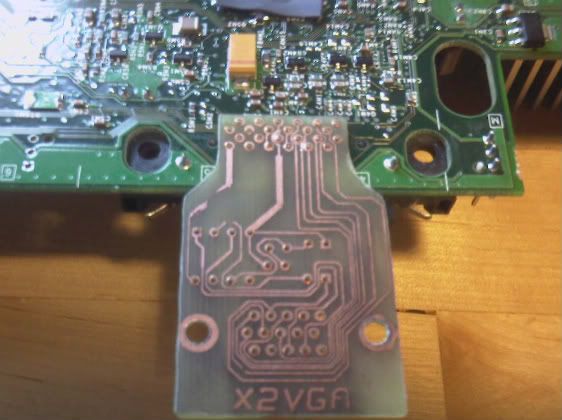
Friday I began connecting the VGA PCB to the Xbox, I finished this task Saturday so of course I tried the VGA PCB right away.
I then found out that I didn't got any image on the screen. First I thought this was because my monitor possibly wasn't compatible with the signals. So I tried a second monitor and again no image...

I didn't bother to troubleshoot until yesterday. Yesterday (of course when I wasn't at home) I thought of the mode setting that the Xbox requires and which wasn't handled by the PCB and possibly wasn't connected. This would explain why I couldn't get any image on both screens. So when I got home I saw the mode setting pins unconnected, this I immediately fixed in no time. I ran a test and.. again no image.
After a bit of searching I found out that to have a VGA compatible RGB signal the Xbox has to be set to NTSC in stead of PAL which is the default video mode here in Europe. Again this was fixed in no time. But still no image.

The mode setting was correct (mode 1+3) and the signal was NTSC so what else could be wrong?

The Xbox also needs a VGA compatible BIOS and I knew I had one. Cromwell to be exact. So I searched and searched and found nothing that resembled my problem.
So Cromwell didn't give me any visual response. Well I thought, let's try another BIOS, maybe it's just Cromwell trolling me. I still had a copy of Eurasia's generic flash disk laying around and a BIOS binary (Evox m8) on a CD so I flashed this. After flashing I rebooted the Xbox and kept my fingers crossed. And.. my monitor light changed from orange to green and I saw the flubber thing you're supposed to get. VGA worked!! A bit greenish but it worked.
Next I downloaded a VGA compatible BIOS, flashed it with Eurasia's flash disk and it did what I hoped it would. It corrected the colors and VGA was up and running. But how about Cromwell?

I again flashed Cromwell on the Xbox and rebooted the Xbox. Again no image. So maybe VGA isn't initialized at boot, but after Linux has taken control of the display? To check if my predictions were right I burned a copy of Xebian (as it was smaller to download/burn on a disk), popped it in the Xbox and booted it.
To my surprise it took a few seconds and then I saw a shiny happy penguin smiling at me. The display quality was better then expected, the colors were correct, I felt almost as satisfied as Tux.

Here's how I connected my VGA PCB.
The HSYNC and VSYNC points are accessible from the bottom side of the board. I took a bit of soldering tin and for both points I made a cone shaped pin.

Now it was time to solder wires to these pins. As always I stripped, twisted and plated the wires with tin. I then reheated the tin pins and connected the wires to the points.

Below is a picture of the Xbox main board where the AVIP connector used to be. I cleared the holes with very thin solder wick. After this the board was covered in remains of flux. I then cleaned the board with some acetone and a q-tip. The pin numbers are clearly exposed. and the board looks as good as new. The sync wires are visible on the right side of the picture.

The pin-out of the connector is as folowing:
1 VCC 13 Mode select 3
2 audio right 14 Mode GND
3 audio left 15 +12v
4 audio right GND 16 GND
5 audio left GND 17 pin19 GND
6 sp-dif digital audio 18 var (Blue)
7 H-Sync 19 var (Red)
8 V-Sync 20 pin18 GND
9 Mode select 1 21 pin23 GND
10 Mode GND 22 var (Green)
11 Mode select 2 23 var (Composite)
12 Mode GND 24 pin22 GND

The whole setup looked like this. In the top left is a composite to VGA adapter visible that provided me VGA output while my mod wasn't working, in the top right is the power supply visible, in the bottom left a 2.5" hard drive (the DVD drive is beneath the hard drive, there is a piece of paper in between to isolate the both), in the bottom right is the Xbox visible and in the middle is the PCB with a VGA connector connected.

And this was the display I did it for. As you can see the colors are normal and the display quality is like that of a normal VGA output.

zondag 18 september 2011

Xbox server - W.I.P. #1

As I cannot make a VGA adapter right now I started some work on the heat sinks. The stock heat sinks of the Xbox are 'glued' to it with the so called Microsoft goo or bubble gum.

With some gentle force I pulled off the heat sinks of the GPU and CPU. Here you can see the goo.
To remove the goo I used acetone and some q-tips (this was described on some forums as being cheap and perfectly safe).
The result was quite good.
Now I did the heat sinks I moved on to the CPU and GPU. The CPU is on the left and the GPU on the right. You can clearly see the goo on them.
So I did the same as I did with the heat sinks. Q-tips, acetone and a lot of rubbing. The result is self explaining.
I ordered some Arctic Silver 5 thermal paste as replacement. I heard good things about it, so I hope it will help some. I want to cool the Xbox as quiet as possible, so passive cooling is a must.

Xbox server - Kick-off

I just started a new project or better said, restarted an old project.
I've got 2 XBox's laying around and I thought, let's make a server out of these.

I'm first going to try to get VGA output on one of these Xbox's. I tried it a couple of years earlier but failed at it.
The problem seems to be at getting the horizontal and vertical sync signals to give to a VGA connection.
There are 3 known methods of getting the sync signals:
  • Using Sync On Green
  • Using a sync splitter
  • Using the Xbox's internal sync signals
Sync On Green
The problem with SOG is that the monitor to be connected on it must support SOG. My monitors don't, and to prevent any future problems, I never attempted this. (Well I think I once did, but it didn't quite work. :-) )

Using a sync splitter
I've tried this method a couple of years earlier. I actually made a PCB for this one.
This was just a test. I just removed the actual PCB I tried to use, here are two pictures.


As you can see on the PCB I soldered some additional wires. With these wires I tried to fix what didn't work. The monitor kept showing the "not connected" message (before the wires) but after the wires the monitor just went to sleep.

But now I'm going for another try using the internal sync signals.

Internal sync signals
I looked up a tutorial on how to make this magic happen. Now it seems I need some electronics I don't happen to have. So I'm ordering right now :-)

I'm using this tutorial to mod one of my Xbox's.

I already did some work, but I'll put this in another post as this is getting a bit long :-)